

How Smart Automation Improves Security In A Prefab Office Booth
Oct 22, 2026
Leave a message
How Smart Automation Improves Security in a Prefab Office Booth

Introduction: Why Smart Security Matters for Prefab Office Booths
A separate workspace can offer privacy, flexibility, and a more comfortable working environment. However, when a prefab office booth is installed in a backyard, commercial property, construction site, or shared office, security becomes an important part of the planning process.
Traditional locks and standalone alarms can provide basic protection, but modern smart systems offer more ways to manage access, monitor the space, and control everyday functions. When compatible devices work together, users can manage lighting, door access, and selected environmental settings through a connected control system.
For businesses considering a Prefab Office Booth, these features can be particularly useful when the space contains computers, documents, equipment, or other valuable items. They can also simplify access management for teams that share a workspace or use the booth at different times.
The important point is that smart automation should be designed around the building's intended use. A private office, a backyard workspace, and a modular accommodation unit may require different security arrangements.
How Smart Automation and Security Work Together
Smart automation connects selected building functions so they can be managed through a central controller, compatible application, or other control interface.
Depending on the system, this may include electronic locks, door and window sensors, motion detectors, lighting controls, cameras, and temperature sensors. The exact functions available depend on the devices installed and whether they support the same communication protocols.
Instead of operating every device separately, users may be able to create routines that coordinate several functions. For example, an office closing routine could switch off selected lights, adjust the temperature setting, and remind the user to secure the door. If compatible smart locks and sensors are installed, the system may also support remote status checks or notifications.
Key Takeaway: For a business, smart integration can make routine operations easier to manage. However, automation should complement rather than replace sound security practices, suitable physical locks, and appropriate access permissions.
Centralized Control
A central control system provides a convenient way to manage compatible devices. Users can view status, adjust settings, and receive alerts via mobile apps or panels. Always confirm supported devices, internet dependencies, and offline power/network behavior.
Automated Lighting
Lighting can be incorporated into security routines-exterior lights scheduled or motion-activated, and indoor lighting responding to occupancy. Note that lighting automation supplements but does not replace dedicated alarms.
Environmental Monitoring
Temperature/humidity sensors monitor indoor climate for unoccupied booths. However, for cold climates, heating, insulation, and ventilation must be properly specified; sensors alone cannot prevent freeze or water damage.
Smart Access Control for a Tiny Office Pod
A Tiny Office Pod can provide a dedicated place for focused work, online meetings, and private business discussions. When the pod is shared by several employees or used outside normal office hours, access control becomes especially important.
Electronic access systems can offer alternatives to traditional keys, including PIN codes, access cards, mobile credentials, or other electronic unlocking methods. Administrators can issue or modify permissions as staff responsibilities change.
Checklist before buying an electronic lock:
• Door & frame compatibility
• Remote permissions management
• Temporary credentials & access logs
• Behavior during power/network failure
• Availability of mechanical overrides
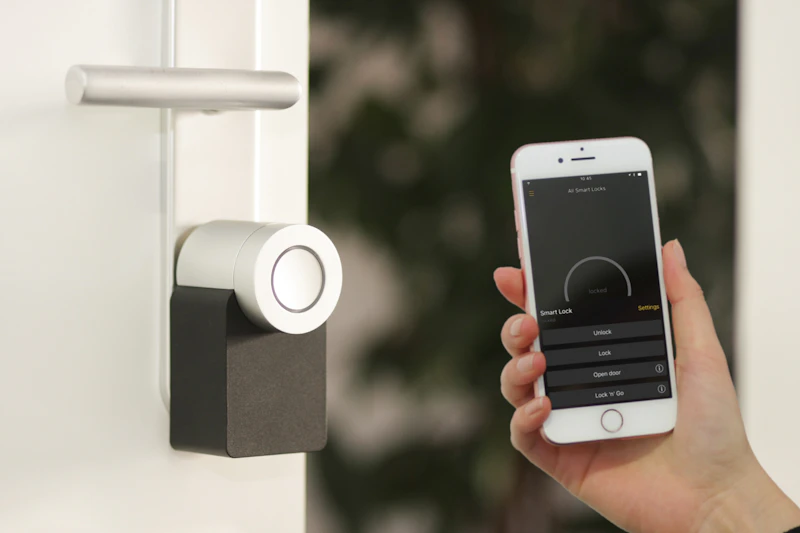
*For a business environment, access logs can help administrators understand when credentials were used. However, a recorded entry does not necessarily establish who physically entered the building, and any monitoring should follow applicable privacy requirements. A well-planned access system can make a compact office easier to manage without adding unnecessary complexity to daily operations.
Connecting Smart Living Pod Features With Security
A Smart Living Pod may combine a compact building layout with selected smart-home functions, including lighting controls, climate management, electronic access, and compatible monitoring devices.
These functions are useful when the pod serves as a backyard workspace, guest room, or multipurpose modular space. Consider a workspace used during the day and left empty overnight: a scheduled routine could switch off equipment, adjust temperature, and activate security devices upon closing.
Buyer Advice: Features vary significantly by manufacturer. Ask whether the system uses an integrated controller, third-party devices, or both, and if features are standard or optional upgrades.
Smart Security for a Modern Mobile Tiny Home
When located away from a main residence, mobile tiny homes have distinct security requirements. Owners may need remote access management, entrance monitoring, or alerts when unattended.
- Electronic door locks with controlled permissions
- Door/window opening status sensors
- Compatible area monitoring cameras
- Indoor temperature monitoring
- Scheduled lighting & automation routines
Note on Mobility: Wiring, antennas, and cameras must be installed to withstand transit and relocation safely.
Double-layer Mobile Cabin and Double Layer Modular House: Managing Multiple Areas
Larger modular structures require detailed planning as they contain separate rooms, multiple entrances, or multiple levels. A Double-layer Mobile Cabin offers expanded floor space, while a Double Layer Modular House serves multi-occupant or multi-functional demands.
Entry Management
Decide which doors require electronic access and assign tiered permissions.
Lighting Control
Set separate lighting schedules for shared spaces vs. specific rooms.
Monitoring Coverage
Identify key exterior/entrance areas while respecting occupant privacy.
Network Coverage
Ensure Wi-Fi or control signals reliably reach upper levels and corners.
Emergency Access
Ensure electronic locks never obstruct safe egress or violate fire codes.

Cabin With Balcony: Extending Security Beyond the Interior
A Cabin With Balcony connects indoor living with outdoor space, but introduces access and weather-exposure considerations. Compatible door sensors help indicate balcony door status, while exterior lighting can be automated via motion sensors.
Camera placement must avoid recording neighboring properties. Furthermore, balcony structural design, guardrails, drainage, and weatherproofing are essential physical elements that electronic monitoring cannot replace.
Tip: Discuss electrical and control layouts with your manufacturer prior to production so wiring paths are built directly into the structure.
Practical Steps to Secure a Prefab Office Booth
Assess whether the booth stores computers, documents, or tools to dictate hardware requirements.
Smart tech cannot fix poorly fitted doors or frames. Secure solid core components first.
Verify locks, sensors, lights, and controllers operate seamlessly within one system.
Assign appropriate user access levels and revoke temporary credentials promptly.
Use unique passwords, enable automatic firmware updates, and protect routers.
Test offline performance, power cut response, backup keys, and notification triggers.
Regularly inspect door hardware, replace lock batteries, update software, and review user privileges.
What Should Buyers Ask a Prefab Office Booth Manufacturer?
Distributors, contractors, and businesses buying directly from a factory must distinguish the building structure from its installed smart equipment.
Key Questions Before Placing an Order:
- Is a smart control system included in the standard configuration?
- Which locks, sensors, cameras, and lighting controls are supported natively?
- Can buyers specify their preferred access-control hardware brand?
- Is the system compatible with existing commercial building automation platforms?
- What precise electrical and network connections are required on site?
- What happens to electronic locks and security features during a power outage?
- Are installation, initial configuration, and after-sales technical support included?
- Which automation features require additional third-party software subscriptions?
Frequently Asked Questions
Can a prefab office booth use a smart security system?
Yes. A prefab office booth can be equipped with compatible smart locks, door sensors, cameras, lighting controls, and other devices depending on electrical provisions.
Can I control a smart office pod remotely?
Remote control is possible when the installed system supports network connectivity and appropriate permissions are configured. Confirm subscription requirements prior to setup.
Does every Smart Living Pod include smart security features?
Not necessarily. The term Smart Living Pod does not guarantee a specific security suite. Always review official factory product specifications.
Can smart security be installed in a Double-layer Mobile Cabin?
Potentially, yes. Larger multi-level structures simply require additional signal repeaters, sensors, and entry-point locks tailored to the floor plan.
Is smart automation enough to protect a modular building?
No. Automation enhances access control and convenience, but must always complement high-quality physical locks, robust site planning, and good network security.
Find the Right Prefab Office Booth for Your Project
Smart automation can make a prefab office booth easier to manage by bringing selected access, lighting, and environmental controls together. Whether you are planning a Tiny Office Pod, a Smart Living Pod, or a larger modular building, it is worth defining required features before production begins.
As a prefab pod and modular building manufacturer, we can discuss available layouts, electrical provisions, customization options, and compatible smart-control configurations for your project.